

Payment Methods
BrandLux Official Policy
Payments, Deposits & Auction Fees
1.0 Payment Methods & Deposits
1.1 Authorized Payment Channels
After registering or logging into your account, users may execute payments directly via the website interface. Authorized payment methods include PayPal, Credit Card (Stripe), Alipay, UnionPay, WeChat Pay, and Direct Bank Transfer (TT) to our designated bank accounts.





1.2 User Deposit Requirements
To maintain a secure bidding environment, BrandLux enforces the following deposit structures based on user status:
(i) Regular Dealer Deposit
40% of the total placed bid amount will be considered as a mandatory deposit upon topping up your wallet. Users in this tier are designated as Regular Dealers and may apply the deposit as direct payment toward successfully won bids.
(ii) Premium Dealer Deposit
Premium Dealers are required to maintain a fixed deposit of JPY 200,000. This status grants the privilege of unlimited bidding without individual bid restrictions. No fees or charges will be deducted from this deposit if an auction bid is unsuccessful.
1.3 Bank Transfer (TT) Instructions
Upon completing a Telegraphic Transfer (TT), users must email a copy of the official TT slip containing the bank’s endorsement. Furthermore, users are required to type their NAME, COMPANY NAME & POSTAL ADDRESS and attach these details to the payment submission page. This ensures accurate tracking of international transactions.
* Failure to adhere to these identification requirements will result in your order NOT being processed.
1.4 Alipay HKD / RMB Checkout Policy
Alipay system protocols automatically convert all checkout transactions to HKD. Due to compatibility constraints, users cannot pay for orders directly in JPY using Alipay HKD/RMB.
Correct Procedure: Users must top up their Wallet using Alipay HKD/RMB. Our administration team will acknowledge the payment, manually convert the HKD equivalent to JPY, and credit your Wallet. Once converted, Wallet funds may be used to settle orders. Please allow a standard processing window for administrators to verify and convert these transactions.
2.0 Auction Bidding & Fee Structure
2.1 Successful Bidding Terms
- In the event a bid is marked as SUCCESSFUL, a specific percentage of the merchandise's final bid value will be charged to the Buyer (refer to Section 2.2 and 2.3).
- Important: For successful bids, any prior deposit payment made shall NOT be automatically deducted for the bidding fee. Any shortfall must be paid separately by the Buyer.
- Payment must be remitted strictly within the designated Auction period. Failure to do so will result in immediate cancellation of the ORDER.
- No merchandise will be prepared for shipment until full payment has been received and cleared by our finance department.
2.2 Brand & Low Price Auction (BA / LP) Fees
※ Applicable exclusively to successful bids. A minimum fee of 600 JPY per item is enforced.
| User Type | Membership Level | Standard Fee | Bank Transfer Rate |
|---|---|---|---|
| Overseas Users |
Premium Member
To learn more about premium membership--click here
|
15% | 12% |
| Regular (Watches) | 17% | 14% | |
| Regular (Others) | 18% | 15% | |
| Local Japan Users | |||
|
Local Premium
To learn more about premium membership--click here
|
10% + 10% Tax | 7% + Tax | |
| Local Regular | 14% + 10% Tax | 11% + Tax | |
2.3 RealTime & TimeLimit Auction (RT / TL) Fees
※ Fees follow a regressive scale based on the winning price. A minimum fee of 800 JPY per item is enforced.
| Winning Price (JPY) |
Premium Rate
To learn more about premium membership--click here
|
Regular Rate |
|---|---|---|
| 1,000 ~ 10,000 | 14% + 500 | 17% + 500 |
| 11,000 ~ 50,000 | 14% + 1,000 | 17% + 1,000 |
| 51,000 ~ 99,000 | 13% + 2,000 | 16% + 2,000 |
| 100,000 ~ 499,999 | 13% + 4,000 | 16% + 4,000 |
| 500,000 ~ 999,999 | 12% + 8,000 | 15% + 8,000 |
| 1,000,000 & Above | 11% + 10,000 | 14% + 10,000 |
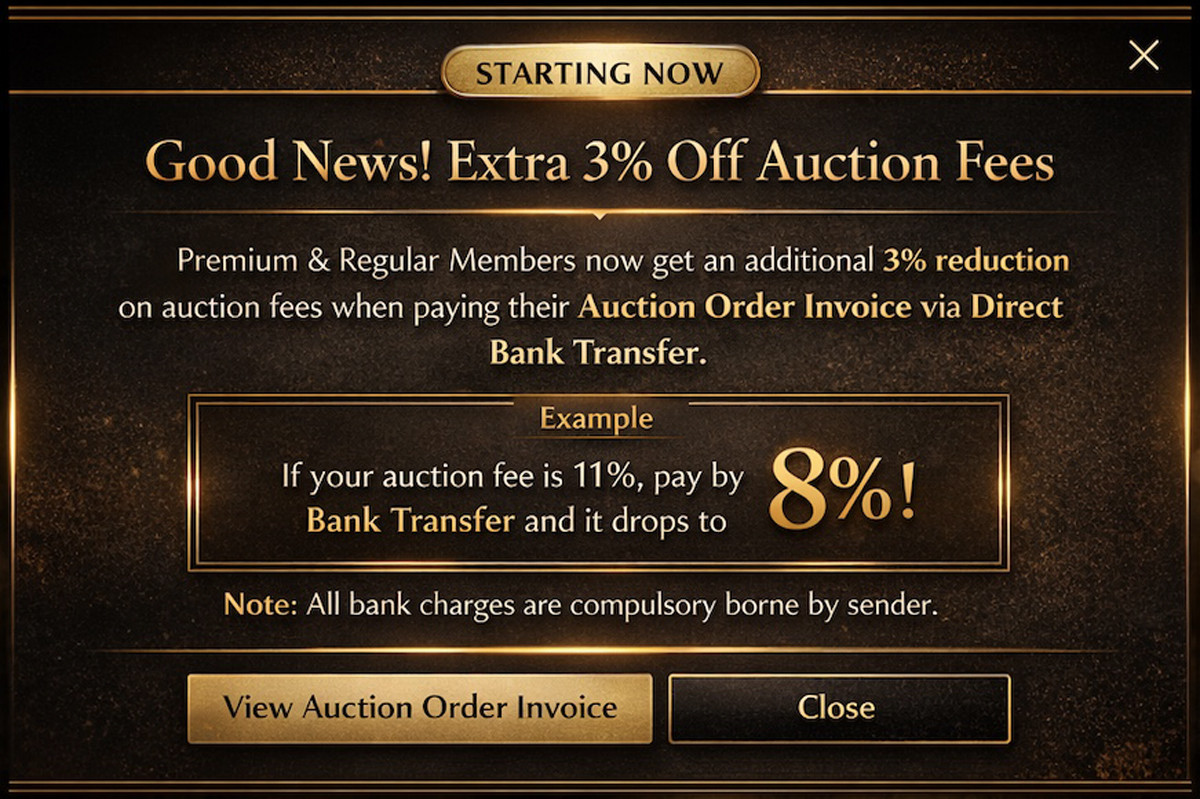
* Strategic Benefit: When paying via Bank Transfer, the percentage portion of RT/TL fees also qualifies for the additional 3% reduction.
3.0 Wallet Recharge Procedure
To ensure seamless bidding and payment, users are encouraged to maintain sufficient funds in their BrandLux Wallet. Funds may be added using the following sequential protocol.
3.1 Standard Recharge Steps
- Authenticate and log in to your BrandLux account.
- Navigate to the left sidebar menu and select "My Wallet".
- Locate and click the "+ Recharge Wallet" action button.
- Input the exact intended recharge amount (denominated in JPY) into the designated field.
- Select an authorized payment gateway from the dropdown menu and proceed according to the gateway-specific protocols below.
3.2 Gateway-Specific Protocols
3.2.1 Bank Transfer Protocol (Recommended)
- Select "Bank transfer" and confirm the declaration.
- Initiate a transfer for the exact declared amount to the provided official BrandLux Bank Account.
- Return to the Wallet interface and securely upload the bank-endorsed payment receipt as proof of transfer.
- Note: Bank transfers are subject to manual administrative verification. Funds will be credited to the Wallet ledger strictly upon confirmation of receipt by the finance team.
3.2.2 PayPal Security Protocol
- Select "PayPal" and confirm to be securely redirected to the PayPal gateway.
- Complete the authorization within the PayPal environment.
To prevent security holds or transaction freezing, the Billing/Shipping Address and Account Name provided on BrandLux MUST strictly match the registered details in your PayPal account. Discrepancies may trigger automated security reviews.
3.2.3 Credit/Debit Card Protocol (Stripe)
- Select "Stripe" or "Debit or Credit Card" to invoke the secure payment iframe.
- Input all requisite card data (Number, Expiry, CSC) and registered Billing Address accurately.
- Submit the form to process the payment. Approved transactions will be credited to the Wallet instantaneously.